MCP for Web Content Manager of HCL DX
Connect AI Agents with Governed Enterprise Content
Enterprise websites, portals, and intranets can contain thousands of pages, documents, policies, product details, service instructions, and digital assets. However, customers, employees, and partners may still struggle to find the precise information they need.
A website visitor may know what they want to accomplish but may not know the terminology used in the navigation. An employee may know that a policy exists but not where it is published. A customer may need information from multiple pages before understanding a service or completing a digital journey.

Web Content Manager of HCL Digital Experience provides a strong foundation for creating, approving, governing, and publishing digital content. However, publishing information does not automatically make it easy for users to discover, understand, or use.
An MCP for Web Content Manager of HCL DX creates a secure and governed connection between approved CMS content and AI Agents. It allows an AI Agent to search published content, understand user intent, retrieve relevant information, summarize complex pages, and guide users to the correct content or digital destination.
The result is a website, portal, or intranet that does more than display information. It allows users to interact conversationally with approved enterprise content.
Why Websites Need a Smarter WCM Experience
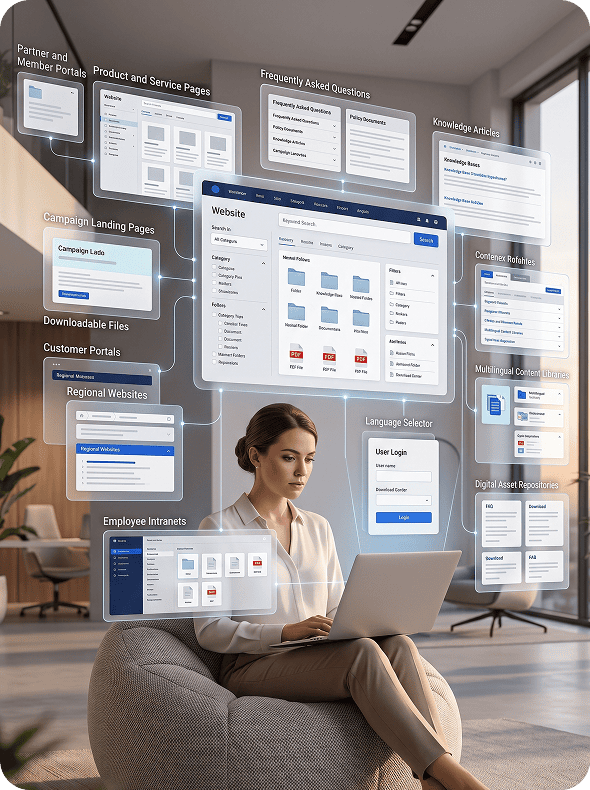
Websites have become essential business platforms. Customers use them to research products, understand services, review requirements, find policies, and access support information. Employees depend on intranets for procedures, guidelines, announcements, and internal resources. Partners and members use portals to access documentation, program information, and approved digital content.
Despite this importance, many enterprise websites still depend heavily on complex menus, manually organized navigation, and keyword-based search.
Information may be distributed across:
 Product and service pages
 - Frequently asked questions
- Policy documents
- Knowledge articles
- Campaign landing pages
- Downloadable files
- Customer portals
- Regional websites
- Employee intranets
- Partner and member portals
- Multilingual content libraries
- Digital asset repositories
Traditional website search works best when users know the exact terminology used within the content.

In reality, people describe their needs conversationally.
They ask questions such as:
- “Which service is right for my organization?”
- “What documents do I need before applying?”
- “Where can I find the latest policy?”
- “What are the requirements for this program?”
- “Which product supports this capability?”
- “Can you summarize this document?”
- “Where is the form mentioned on this page?”
- “Is this information available in another language?”
A basic website chatbot may answer a limited set of scripted questions. However, it may fail when the user’s request requires current content, information from multiple pages, access-controlled content, or an understanding of how content is organized within the CMS.
This is where MCPs for web content management become important.
MCP provides a structured and governed way for AI Agents to interact with approved website, portal, and intranet content without receiving unrestricted access to the complete content environment.
What Is MCP for Web Content Manager of HCL DX?
Model Context Protocol, or MCP, is an architecture that allows AI applications to connect securely with approved resources, tools, APIs, and data sources.
For HCL DX Web Content Manager, the MCP server acts as a governed access layer between the CMS and an AI Agent. Instead of giving the Agent unrestricted access to the entire content environment, it defines which content can be searched, retrieved, summarized, or presented.
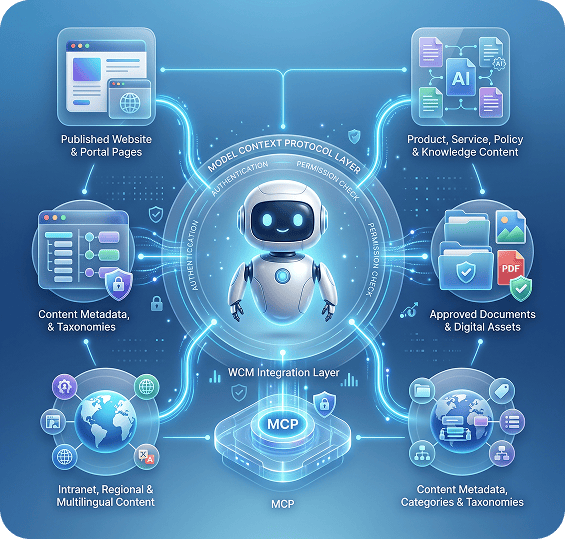
Content the AI Agent Can Access
An MCP for Web Content Manager of HCL DX can provide controlled access to:
- Published website and portal pages
- Product, service, policy, and knowledge content
- Approved documents and digital assets
- Intranet, regional, and multilingual content
- Content metadata, categories, and taxonomies
Content Capabilities Supported Through MCP
The MCP layer can allow the AI Agent to:
- Search and retrieve approved content
- Find related pages and documents
- Summarize or compare published information
- Guide users to the correct page or resource
- Retrieve the latest approved or multilingual content
- Support authorized WCM editorial workflows
An MCP for CMS therefore provides a secure and reusable connection between HCL DX Web Content Manager and compatible AI applications.
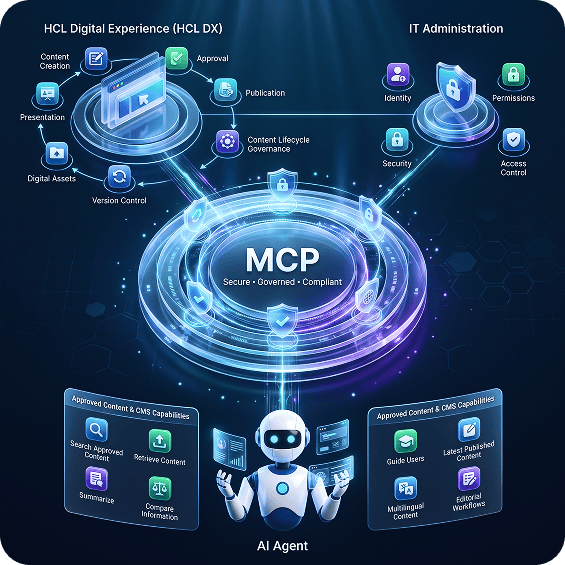
MCP Does Not Replace HCL Digital Experience
MCP extends HCL Digital Experience; it does not replace it.
HCL DX continues to manage content creation, authoring, approval, publication, presentation, version control, digital assets, and content lifecycle governance.
MCP makes selected content and approved CMS capabilities available to AI Agents while content teams continue using their existing HCL DX processes. IT teams also retain control over identity, permissions, security, and access.
Why AI Agents Need Approved CMS Content
Large language models can understand questions, summarize information, and generate natural responses. However, a general-purpose model does not automatically know what is currently published within an organization’s website, portal, or intranet.
It may not know:
- Whether a product page is current
- Whether a policy has changed
- Which service applies to a specific region
- Which document version has been approved
- Whether a page is published or archived
- Whether content is public or restricted
- Which language version should be used
- What information the user is authorized to access
- Which page should be treated as the official source
Without approved enterprise context, an AI Agent may provide incomplete, outdated, or unsupported information.
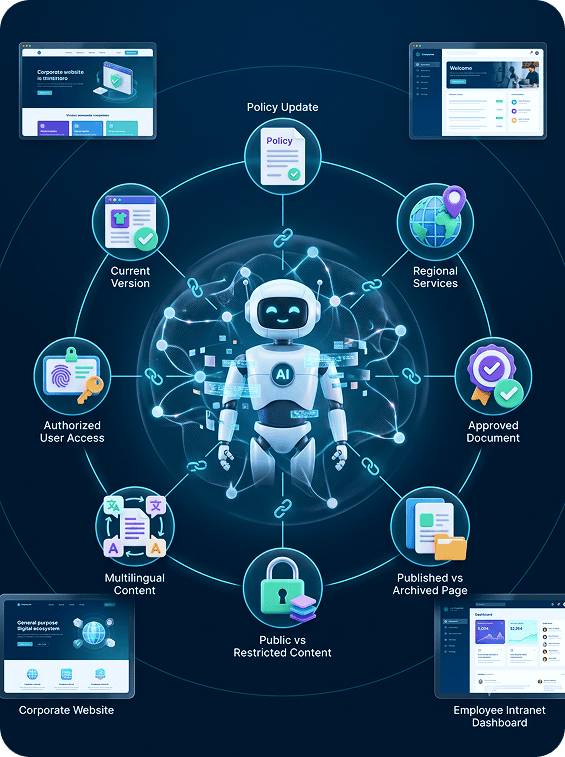

An MCP for WCM helps reduce this risk by allowing the AI Agent to retrieve current and approved content before generating an answer.
For example, when a visitor asks, “What documents do I need to apply?”, the Agent can:
- Understand the visitor’s intent.
- Identify the relevant service or program.
- Search approved HCL DX Web Content Manager resources.
- Retrieve the latest published requirements.
- Present a concise and understandable response.
- Link the visitor to the official source page.
- Guide the visitor to the appropriate form or next content step.
The response is grounded in managed CMS content rather than generated from general model knowledge alone.
Introducing an MCP-Enabled AI Agent for HCL DX
Streebo, a leading Digital Transformation and AI company, provides pre-built and customizable MCP integration capabilities for connecting AI Agents with Web Content Manager of HCL DX.
The solution extends existing HCL DX investments without requiring organizations to replace their CMS, rebuild content libraries, or duplicate approved content in a separate AI knowledge repository.
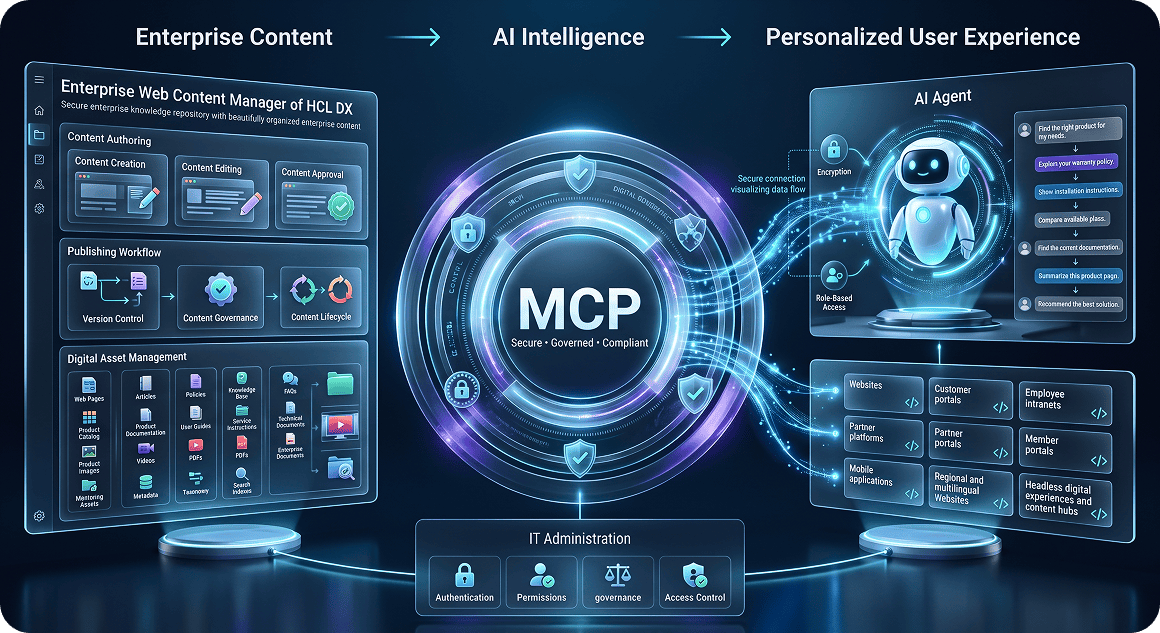
The MCP-enabled AI Agent can be deployed across:
- Corporate websites and customer portals
- Regional and multilingual websites
- Employee intranets and partner platforms
- Headless digital experiences and content hubs
- Member portals and mobile applications
Only approved content resources and permitted CMS tools are exposed through the MCP layer. Business users gain a conversational content experience, while IT and content teams retain control over authentication, permissions, publication status, access, and governance.
How the MCP–Enabled AI Agent Works
01.
Understand User Intent
The interaction begins when a customer, employee, partner, or website visitor asks a question in natural language.
For example, a request such as, “I need information about services available for a company operating in three countries,” may require the Agent to identify relevant services, regional availability, eligibility information, supporting documents, and the appropriate webpage.
The Agent understands the user’s intent before selecting the required CMS content.




02.
Retrieve Approved WCM Content
The MCP allows the Agent to search selected HCL DX content libraries and retrieve relevant information.
Access can be controlled using:
- Publication status and content library
- Website, portal, or content type
- User identity and role
- Region and language
- Content category and security classification
- Effective and expiration dates
These controls help prevent draft, expired, archived, or unauthorized content from being used in responses.
03.
Use CMS Metadata and Content Structure
The Agent can use approved metadata such as titles, tags, categories, language, audience, publication dates, approval status, and related-page relationships.
This helps it identify authoritative and relevant content instead of relying only on keyword matching.

- • 📎 A downloadable PDF
- • 📝 An online application form
04.
Generate a Grounded Response
Using content retrieved from HCL DX Web Content Manager, the Agent can:
- Publication status and content library
- Present relevant options
- Link users to official source pages
- Recommend related pages or documents
- Compare information from multiple approved sources
- Guide users through website navigation
- Escalate unclear or unsupported requests to a human
05.
Support Approved CMS Actions
The Agent may also use permitted MCP tools to perform controlled content-related actions, such as:
- Open the correct page or retrieve a document
- Display related or multilingual content
- Identify the latest approved version
- Report outdated content or broken links
- Submit content feedback
- Initiate an editorial review or correction request
- Start a governed publishing workflow
Sensitive editorial actions can require authentication, user confirmation, or human approval.
Available languages:
-
•
 English
-
•
 German
-
•
 French
-
•
 Spanish
-
•
 Japanese
MCP Architecture for Web Content Management
A production-ready MCP for CMS can be organized into four connected layers.
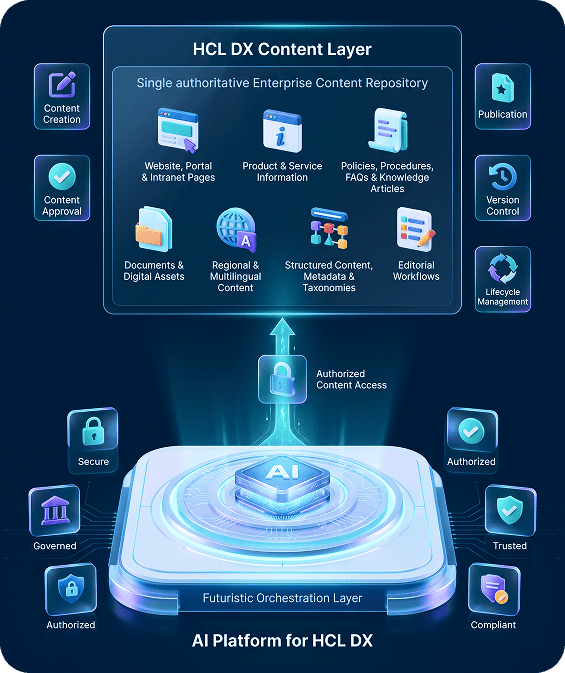
HCL DX Content Layer
This layer contains the approved content managed within HCL Digital Experience and Web Content Manager, including:
- Website, portal, and intranet pages
- Product and service information
- Policies, procedures, FAQs, and knowledge articles
- Documents and digital assets
- Regional and multilingual content
- Structured content, metadata, and taxonomies
- Editorial workflows
HCL DX remains the authoritative source for content creation, approval, publication, and lifecycle management.
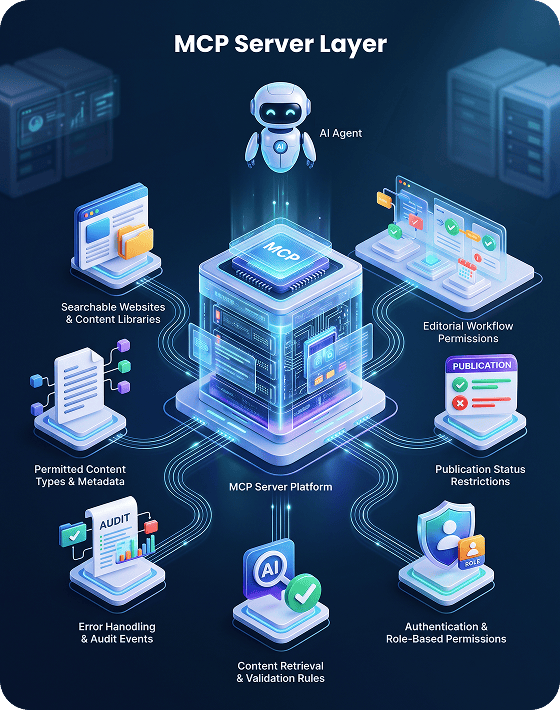
MCP Server Layer
The MCP server defines which CMS resources and content tools are available to the AI Agent. It controls:
- Searchable websites and content libraries
- Permitted content types and metadata
- Publication-status restrictions
- Authentication and role-based permissions
- Content-retrieval and validation rules
- Editorial workflow permissions
- Error handling and audit events
This creates a reusable integration layer instead of building a separate CMS connection for every Agent, model, or channel.
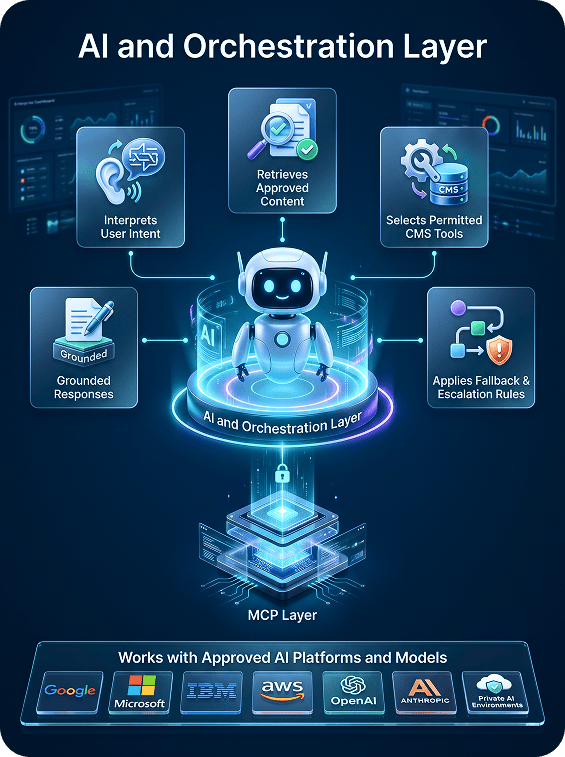
AI and Orchestration Layer
The AI and orchestration layer:
- Interprets user intent
- Retrieves approved content
- Selects permitted CMS tools
- Generates grounded responses
- Applies fallback and escalation rules
It can work with approved AI platforms and models from Google, Microsoft, IBM, AWS, OpenAI, Anthropic, or private environments.
Because CMS resources are exposed through MCP, organizations can support different approved AI models without rebuilding the HCL DX integration.
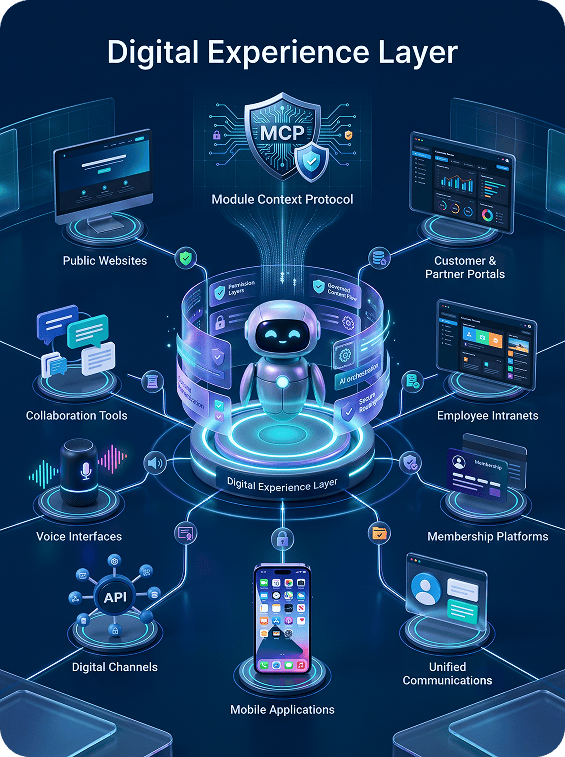
Digital Experience Layer
The MCP-enabled AI Agent can be delivered through:
- Public websites
- Customer and partner portals
- Employee intranets
- Member platforms
- Mobile applications
- Headless digital channels
- Collaboration and voice interfaces
The same governed CMS resources can support multiple channels while maintaining channel-specific permissions and content policies.
Why Web Content Manager Needs an MCP-Enabled AI Layer
HCL DX Web Content Manager can contain extensive and carefully governed content. However, users may still experience difficulty locating information through traditional navigation and keyword search.
An MCP-enabled AI layer makes content more conversational and accessible.

Website Content Discovery
Visitors can ask questions naturally and receive responses grounded in approved website content.

Guided Website Navigation
The Agent can explain where particular information is located and guide users through the website structure.

Portal Navigation Support
Users can describe what they are trying to accomplish, and the Agent can direct them to the correct page, document, section, or digital resource.

Intranet Knowledge Search
Employees can locate HR policies, IT instructions, procurement guidance, compliance documents, announcements, and operating procedures.

Customer Self-Service Content
Customers can find policies, instructions, eligibility requirements, service information, and frequently asked questions without manually browsing multiple pages.

Content Summarization
Long pages, policies, and documents can be summarized into concise and understandable responses while preserving links to the original source.

Product and Service Information Lookup
The Agent can interpret a user’s requirements and retrieve relevant product or service information from approved CMS pages.

Related Content Recommendations
The Agent can use CMS metadata, taxonomies, and relationships to recommend relevant pages, documents, or resources.

Guided Form Information
The Agent can explain fields, requirements, supporting documentation, and instructions published within the CMS without submitting or processing the form itself.

Multilingual Content Discovery
The Agent can locate and present the approved language version of relevant content.
Core Features of Our MCP-Enabled Website AI Agent

MCP for Web Content Manager of HCL DX
Connect compatible AI Agents securely with approved HCL DX Web Content Manager resources.

Content Source Citations
Provide links or references to the HCL DX pages used to generate the answer.

Approved Content Retrieval
Retrieve selected published content without giving the AI Agent unrestricted access to the complete content estate.

Conversational Website Support
Understand questions expressed naturally rather than relying only on fixed menus, keywords, or scripted intents.

Semantic Content Discovery
Find relevant content based on user meaning and intent rather than exact keyword matches alone.

CMS Metadata Awareness
Use tags, categories, language, region, publication date, content type, and status to improve content selection.

Guided Navigation
Help users reach the appropriate webpage, document, section, form information, or digital asset.

Content Summarization
Summarize long or complex approved content while maintaining a connection to the authoritative source.

Multilingual Content Access
Retrieve the correct approved language version based on the user’s request and permissions.

Role-Based Content Access
Apply user permissions before protected CMS content or tools become available.

Content Analytics
Analyze common questions, unsuccessful searches, content gaps, outdated pages, and navigation challenges.

Human Escalation
Transfer uncertain, sensitive, or unsupported content inquiries to an authorized content owner or employee.

99%+ Accuracy Framework
The solution is designed to target 99%+ accuracy through:
- Approved-source grounding
- Response evaluation
- Fallback responses
- CMS metadata filtering
- Source citation
- Human escalation
- Retrieval testing
- Confidence thresholds
- Continuous tuning
- Content-quality reviews
- Version and publication-status validation
Accuracy depends on source-content quality, metadata quality, configuration, use-case complexity, testing, and ongoing governance.
For important content journeys, the Agent can display the source, request clarification, or escalate when sufficient approved evidence is unavailable.
Business Benefits of MCP for WCM

Improve Existing HCL DX Investments
An MCP for WCM makes approved HCL DX content more accessible through a conversational AI experience without replacing the CMS.

Improve Website Engagement
Faster access to relevant content can reduce frustration and encourage users to continue exploring the website or portal.

Strengthen Content Governance
The Agent retrieves approved CMS content instead of using uncontrolled copies stored in separate chatbot databases.

Increase Content Reuse
The same approved HCL DX content can support websites, portals, intranets, mobile experiences, and AI-enabled interfaces.

Support Faster AI Deployment
A reusable MCP layer can support multiple AI Agents, models, and digital channels without rebuilding the CMS integration.

Reduce Content-Discovery Friction
Users can describe their needs naturally instead of learning website terminology, menu structures, or exact search keywords.

Improve Content Performance
Content teams can understand which pages are frequently requested, which topics cause confusion, and where users abandon their content journeys.
Security, Governance, and Control
Enterprise AI Agents should not receive unrestricted access to website, portal, or intranet content. A secure MCP for Web Content Manager should include the following controls.

Authentication and Authorization
Users, AI Agents, and connected services must be verified before protected CMS resources become available.

Human Approval
Editorial changes, publishing requests, or other sensitive CMS actions can require human review.

Role-Based Content Access
Public visitors, customers, employees, partners, content authors, editors, and administrators receive content appropriate to their roles.

Publication-Status Validation
Draft, expired, deleted, rejected, or archived content can be excluded from AI-generated responses.

Content-Level Permissions
The MCP layer can enforce restrictions at the website, library, category, page, document, or content-item level.

Tool-Level Permissions
Each MCP tool defines the CMS action the Agent can perform and the conditions required for execution.

Least-Privilege Access
The Agent receives access only to the content and CMS tools required for the current use case.

Data Minimization
Only the content and metadata required to answer the current request are retrieved.

Monitoring and Observability
Operational monitoring can identify failed retrievals, unusual access patterns, low-confidence responses, and content-quality problems.

Prompt-Injection Protection
User instructions or retrieved website content should not be allowed to override system policies, permissions, content restrictions, or governance rules.

Audit Logging
Content retrieval, tool invocation, editorial requests, errors, and permission decisions can be recorded.
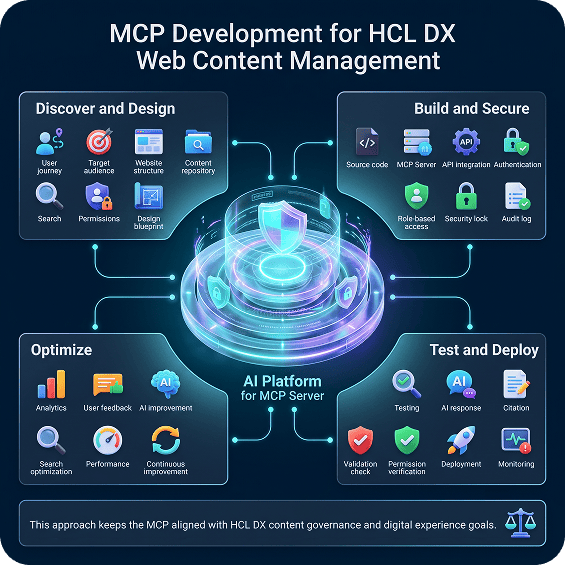
MCP Development for Web Content Management of HCL DX
Successful MCP development should begin with priority content journeys and user needs rather than the technical connector alone.

Discover and Design

Identify target users, key HCL DX content sources, access requirements, MCP resources, permissions, and expected outcomes.

Build and Secure
Develop the MCP server, connect approved CMS content, and implement authentication, role-based access, encryption, and audit controls.

Test and Deploy
Validate content retrieval, response accuracy, source citations, permissions, and fallback handling before deployment.

Optimize
Use analytics, feedback, and unsuccessful searches to continuously improve content discovery and the user experience.
This approach keeps the MCP aligned with HCL DX content governance and digital experience goals.
Why Custom Enterprise MCPs Matter
Generic MCP connections may provide basic access to standard APIs. Enterprise HCL DX environments, however, are rarely standard.
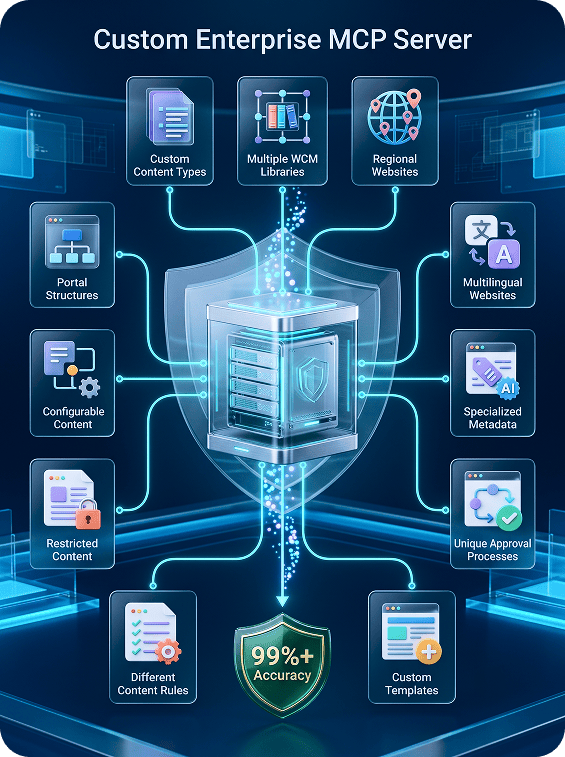
Organizations may have:
- Custom content types
- Multiple WCM libraries
- Regional websites
- Multilingual websites
- Specialized metadata
- Unique approval processes
- Complex taxonomies
- Custom templates
- Restricted content
- Industry-specific publishing controls
- Different content rules for different audiences
- Bespoke website and portal structures
Custom MCPs for web content management map these requirements into controlled resources, tools, permissions, and content rules.
For example:
- A financial-services website may need the Agent to display only approved product information and related disclosures.
- A government portal may need to identify the correct content based on region, program, language, and effective date.
- A generic connector helps an AI Agent access a CMS.
- A customized MCP helps the Agent operate correctly within the organization’s HCL DX content environment.
The Future of MCP for WCM Integration
MCP-enabled AI Agents are transforming how users engage with websites, portals, and intranets. Rather than navigating complex content structures or relying on exact search terms, users can describe their needs in natural language and receive clear, source-grounded responses based on approved HCL DX content.
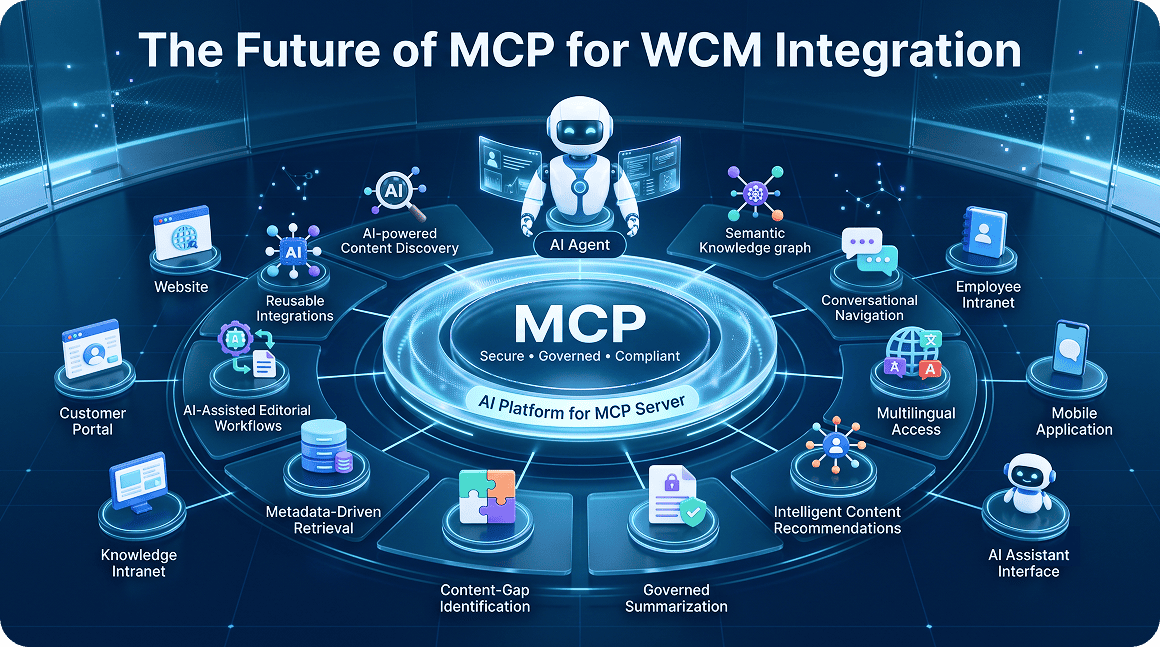
As MCP adoption grows, organizations will increasingly use AI-powered content discovery, semantic search, conversational navigation, multilingual access, intelligent content recommendations, and governed summarization to improve digital experiences. MCP will also support more advanced capabilities, including content-gap identification, metadata-driven retrieval, AI-assisted editorial workflows, and reusable integrations across multiple AI models and channels.
By implementing MCP for WCM, organizations can make existing content easier to discover, understand, and use while preserving the security, governance, and content controls provided by HCL Digital Experience.
Start small. Scale as you prove ROI.
No setup fees. A 30-day trial is available so you can see it working on your own catalog first.
- Functionality: FAQs
- Source System: Website + Brochures + Docs (upto 10K Pages)
- Channels: ChatGPT + Web
- Functionality: FAQs + 3 Business Function
- Source System: Upto 3 Backend Systems
- Channels: ChatGPT + Web + Voice
- Functionality: FAQs + 5 Business Functions
- Source System: Upto 5 Backend Systems
- Channels: ChatGPT + Web + Voice + Email
All prices in USD. $/Hour reflects effective hourly cost based on estimated monthly usage.
FAQ’s
Frequently Asked Questions
What is MCP for Web Content Manager of HCL DX?
An MCP for WCM is a governed integration layer that allows AI Agents to securely search, retrieve, summarize, and use approved content from HCL DX Web Content Manager.
Does MCP replace HCL Digital Experience?
No. MCP extends HCL Digital Experience by making selected CMS content and approved WCM capabilities available to compatible AI applications.
What is the difference between MCP and RAG?
Retrieval-augmented generation helps an AI model retrieve relevant knowledge before answering. MCP provides a standardized interface for accessing approved resources and invoking permitted tools. MCP and RAG can be used together.
How does Streebo’s MCP connect AI Agents with Web Content Manager?
Streebo develops and configures an MCP server that exposes selected HCL DX content resources, metadata, and approved CMS tools to the AI Agent under defined access and governance rules.
How does MCP improve website AI Agent accuracy?
The MCP allows the Agent to retrieve current, published, and approved CMS content instead of relying only on general model knowledge.
Can the Agent provide sources for its answers?
Yes. The Agent can provide links or references to the HCL DX pages, documents, or content items used to generate the response.
Can the Agent search multiple HCL DX websites?
Yes. The MCP can be configured to search approved content across multiple websites, portals, libraries, regions, or language versions.
Can the Agent access draft content?
Access depends on the use case and permissions. Public-facing Agents should normally use only published content. Authorized editorial Agents may be permitted to access draft content under controlled conditions.
Can this solution support customer portals and intranets?
Yes. The architecture can support public websites, authenticated customer portals, employee intranets, partner platforms, member portals, and mobile digital experiences.
Can it support multilingual content?
Yes. The Agent can identify, retrieve, and present approved content in the appropriate available language.
Can the Agent summarize long pages and documents?
Yes. The Agent can summarize approved content while linking the user to the authoritative source.
Is the MCP-enabled AI Agent secure?
Security depends on the complete implementation. Important controls include authentication, authorization, encryption, least-privilege access, publication-status validation, content-level permissions, monitoring, and audit logging.
How long does implementation take?
A focused proof of concept may take several weeks. Enterprise implementation depends on content volume, content structure, metadata quality, access rules, security reviews, languages, and testing requirements.
How much does the solution cost?
Pricing depends on the number of HCL DX environments, websites, content libraries, languages, CMS tools, users, deployment requirements, and support needs.
Build a More Intelligent HCL DX Content Experience
Enterprise content should not remain hidden behind complex menus, deeply nested website structures, and keyword-dependent search.
With an MCP for WCM, AI Agents can securely access approved HCL DX content, understand what users are trying to find, and guide them toward relevant and authoritative information.
Customers can discover products and services more easily. Employees can locate internal knowledge faster. Partners and members can navigate portal resources more effectively. Content teams can identify missing, outdated, or difficult-to-find information.
Start with one high-value content journey.
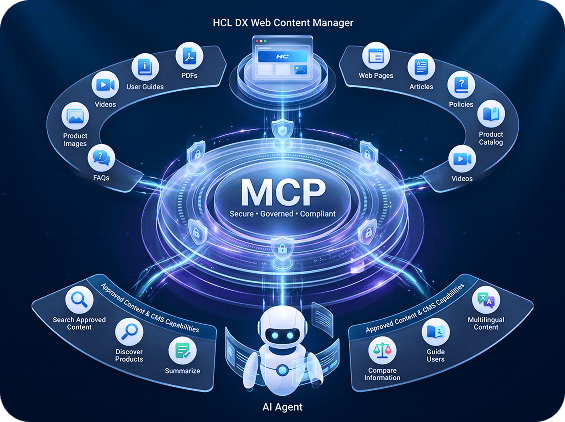
Connect the required HCL DX Web Content Manager resources. Expose a controlled set of content tools. Test retrieval quality, accuracy, citations, permissions, and user experience. Then expand the MCP architecture across additional websites, portals, content libraries, languages, and channels.
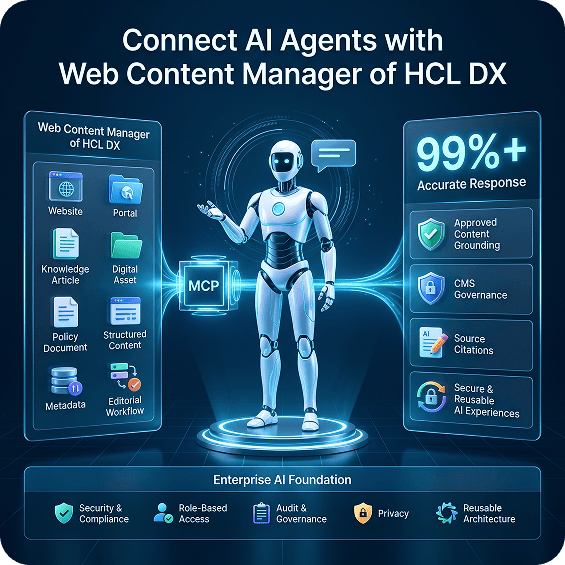
Connect AI Agents with Web Content Manager of HCL DX
Make enterprise content easier to discover, understand, and use.
Build secure and reusable AI experiences with approved-content grounding, CMS governance, source citations, and a framework designed to target 99%+ accuracy.
Explore MCP Integration for Web Content Manager of HCL DX.