Gen AI-Powered AI Agent Integration with Microsoft SharePoint
Introduction: SharePoint—A Powerful Repository Lost in Clutter
Microsoft SharePoint has become the digital backbone for over 250 million monthly active
users worldwide, serving as the central repository for HR guidelines, sales collateral,
legal contracts, and operational SOPs. As enterprises scale, however, SharePoint
environments often grow into sprawling, chaotic ecosystems where locating information
becomes a frustrating exercise.
Despite having folder structures, metadata tagging, and permission layers, the fundamental
problem remains: to find exactly what you need, quickly and accurately.
Studies
highlight the extent of the problem:
 IDC reports that employees spend 2.5 hours every
day
searching for
information.
IDC reports that employees spend 2.5 hours every
day
searching for
information.
 McKinsey estimates nearly 20% of working time
is lost to information
retrieval.
McKinsey estimates nearly 20% of working time
is lost to information
retrieval.
Traditional SharePoint search tools—designed around keyword matches and manual
browsing—simply aren’t enough. Employees type in queries like “travel policy,” only to
be
bombarded with dozens of outdated or irrelevant documents. SharePoint lacks the
conversational ability to clarify, summarize, or reason across documents, leaving
employees
to sift manually.
This challenge magnifies at enterprise scale, impacting HR onboarding, sales enablement,
legal compliance, and IT support.
Fortunately,advancements in AI, specifically Generative AI and Vector
Search, have
unlocked
a transformative solution:

Traditional SharePoint search tools—designed around keyword matches and manual
browsing—simply aren’t enough. Employees type in queries like “travel policy,” only to
be
bombarded with dozens of outdated or irrelevant documents. SharePoint lacks the
conversational ability to clarify, summarize, or reason across documents, leaving
employees
to sift manually.
This challenge magnifies at enterprise scale, impacting HR onboarding, sales enablement,
legal compliance, and IT support.
Fortunately, advancements in AI, specifically Generative AI and Vector Search,
have
unlocked
a transformative solution:
 Precise, conversational document retrieval
- Cross-document reasoning
- Real-time summarization and translation
It is about SharePoint into a truly intelligent, dynamic knowledge engine. Let’s explore how!
The True Cost of Inefficient Document Discovery
In today’s knowledge-driven enterprises, finding the right information quickly is no longer a luxury—it’s a necessity for productivity, compliance, and business agility. Yet for many organizations, SharePoint, despite being a powerful repository, often becomes a buried treasure chest where valuable information is hard to locate.

The cost of inefficient document discovery is staggering:
Lost ProductivityEmployees waste countless hours navigating folders, trying multiple search terms, and manually sifting through outdated documents. According to IDC, knowledge workers spend up to 2.5 hours daily searching for information instead of performing strategic tasks.
Increased IT Support LoadInability to find documents often leads to unnecessary helpdesk tickets. Industry data shows that 48% of internal IT tickets are related to issues of document retrieval or access.
 Delayed Business Outcomes
From slow customer responses to missed project deadlines, the impact of poor document discovery ripples across sales, operations, HR, and legal departments.
 Compliance Risks
When legal and regulatory teams cannot quickly retrieve the correct version of contracts, NDAs, or compliance policies, enterprises risk audits, fines, and reputation damage.
 Employee Dissatisfaction
Modern employees expect search experiences similar to consumer apps—instantaneous, intuitive, and accurate. Poor internal search drives disengagement and reduces workforce morale.
Why Traditional Search Isn’t Enough
Traditional keyword search in SharePoint was designed for an era when repositories were smaller and queries were simpler. Today’s enterprises require much more:
- Understanding the context behind
a
search.
- Reasoning across documents to
find the
best answer.
- Summarizing long files into
digestible
insights.
Keyword matching cannot deliver this level of intelligence.
This is why enterprises are now leveraging the power of AI agents—to infuse true intelligence
into SharePoint through conversational, precise, and high-accuracy document search powered by AI
and Vector Search.
Bringing Microsoft Copilot Studio & Enterprise GPT Intelligence into SharePoint
Today’s enterprises face a critical challenge: how to locate trusted, accurate
information
across thousands of documents stored within SharePoint.
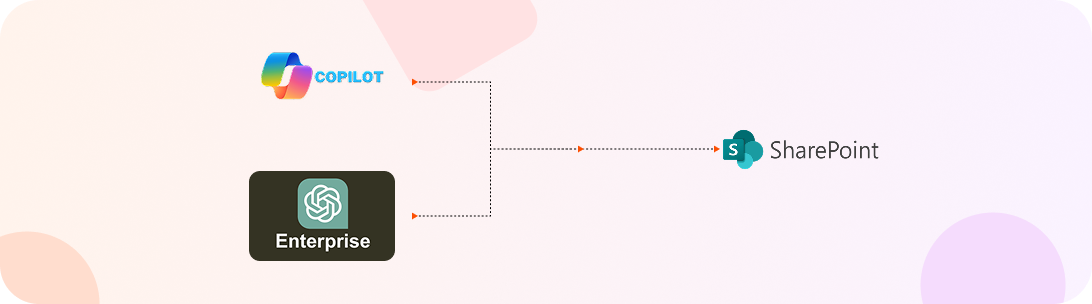
Streebo, a services company, helps organizations integrate their SharePoint environment
with AI technologies like Microsoft Copilot Studio and Enterprise GPT models on Azure.
By implementing intelligent document discovery, we help enterprises sift through
vast
repositories and surface precise answers with up to 99% accuracy. Our role is
to accelerate
your AI journey by securely embedding Microsoft’s advanced Gen AI capabilities
into your
existing SharePoint infrastructure.
What Microsoft Copilot Studio & Enterprise GPT Powered AI Agent Enable Inside SharePoint

Once integrated, Microsoft Copilot Studio and Enterprise GPT powered AI Agents deliver a fundamentally new way to interact with SharePoint:
 Natural Language Search
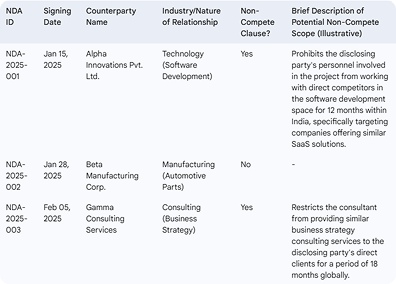
Users no longer need to remember folder structures or guess keywords. They can simply ask questions like, “Find the latest employee expense policy” or “List NDAs with non-compete clauses signed this year.”
 Semantic Retrieval Using Vector Search
Instead of matching keywords, the system understands the meaning of the query and retrieves the most relevant documents across vast libraries.
 Real-Time Document Summarization
Long compliance reports, HR policies, or contracts can be condensed instantly into key points, helping employees digest information faster.
 Cross-Document Insights
The AI agent can draw information from multiple documents to answer layered or complex queries, providing comprehensive responses.
 Dynamic Multilingual Support
Documents can be translated on-the-fly, empowering global teams to work seamlessly across language barriers.
 Security and Compliance Adherence
 All interactions are tightly governed by SharePoint’s existing role-based access controls and Azure Active Directory (AAD) security models.
With Microsoft Copilot Studio and Enterprise GPT powered AI agents infused into SharePoint,
the
experience shifts from static search to dynamic, conversational knowledge
access.
Employees get
immediate, contextually accurate information—reducing time spent searching, lowering support
costs, and driving operational agility.
Through careful integration, enterprises can
realize
the
full potential of their SharePoint
investments —powered by Microsoft’s trusted AI platforms.
How Microsoft AI-Powered AI Agents Transform SharePoint
The difference between a traditional SharePoint search experience and one enhanced by a
Microsoft Copilot Studio & Enterprise GPT on Azure powered AI Agent is significant.
Let’s explore real-world scenarios illust this transformation:
Scenario
HR Policy Lookup
An employee needs the latest maternity leave policy. They log into SharePoint, navigate through multiple folders, and open several documents—unsure which one is current. Frustrated, they email HR and wait for a response.

Outcome:
Delayed decision-making, lost productivity, and added HR workload.

The employee simply asks via Teams or SharePoint, “What is the current maternity leave policy?” The AI Agent instantly responds with a summarized policy update, key highlights, and a secure document link.


What is the current Paternity leave policy?


Married male employees are entitled for 3 days of paternity
leave
which is limited to two live child births by their spouse.
The management and HR Department should be notified before two
weeks
for the intended leave.

Employee Policy.pdf



Outcome:
Immediate access, faster decision-making, and reduced HR dependency.

Scenario
IT Support – Access to SOPs
A remote employee needs a VPN setup guide. Traditional search in SharePoint provides outdated or irrelevant documents. The employee raises an IT ticket, causing delays.

Outcome:
Higher helpdesk ticket volume, slower resolution times.
Emma receives a WhatsApp notification from the train operator’s AI assistant about the delay two hours in advance. The chatbot offers alternative routes and rescheduling options. Emma reschedules her trip effortlessly, avoiding unnecessary waiting at the station.

I require access to VPN Document or a software guide.


Sure, here’s VPN steps guidelines.
VPN guide.pdf
Outcome:
Self-service support, reduced ticket volume, improved IT efficiency.
Scenario
Sales Enablement
A sales executive preparing for a meeting spends over an hour searching for the latest approved pitch deck and pricing sheets, risking the use of outdated material.

Outcome:
Wasted preparation time, inconsistent client messaging.
The rep queries, “Get me the latest Product X sales presentation and pricing file.” The AI Agent surfaces the most recent, approved documents immediately.

Get me the latest Product X sales presentation and pricing file..

Sure, here’s Latest documents.
Pricing.xlsx
 Presenatation.pptx
Outcome:
Quicker prep, stronger client engagement, higher win probability.
Scenario
Legal Document Review
A legal associate manually reviews dozens of contracts to locate NDAs with non-compete clauses.

Outcome:
Time-consuming process, higher risk of human error.
The rep queries, “Get me the latest Product X sales presentation and pricing file.” The AI Agent surfaces the most recent, approved documents immediately.

List NDAs signed in Q1 2025 with non-compete clauses.

Outcome:
Faster legal reviews, higher document accuracy, better compliance.
Quantified Impact
Organizations that integrate Microsoft AI-powered AI Agents into SharePoint typically experience:
 Up to 80% faster information retrieval
Source: McKinsey – “The Social Economy
 Up
to 60% reduction in document-related internal support
tickets
Up
to 60% reduction in document-related internal support
ticketsSource: HDI Support Center Practices & Salary Report
 2x faster employee onboarding and
compliance
training
2x faster employee onboarding and
compliance
training
Source: McKinsey – “The Social Economy
 Higher employee satisfaction and
engagement
rates
Higher employee satisfaction and
engagement
ratesSource: Gartner – “Digital Worker Experience Survey
This shift from static keyword search to dynamic, conversational knowledge access represents a fundamental upgrade in enterprise operations.
Behind the Scenes: How the Microsoft AI-Powered Integration Works
Enterprises today store thousands—even millions—of documents inside SharePoint.
Yet finding
exactly the right information quickly has always been a major challenge.
Thanks to AI and Vector Search, precise information can now be located
across
SharePoint
environments in seconds.
When companies integrate a Microsoft Copilot Studio powered AI agent for SharePoint,
SharePoint
transforms from a basic document repository into a smart, conversational
knowledge
platform—powered by the strength of Vector Search and Generative AI.
Smart, Secure Access to
InformationThe Microsoft AI powered SharePoint AI Agent connects securely to SharePoint Online, following all existing user access rules and security settings. Employees can immediately retrieve the documents they are permitted to view—without searching through endless folders.
Vector Search: Finding Meaning, Not
Just
WordsAt the core of the solution is Vector Search, which understands the meaning behind a user’s question—not just matching keywords.
This allows the SharePoint document search bot to pull up the most relevant answers, even if the user’s words are different from the document content.
Using Microsoft’s advanced AI models, the Microsoft SharePoint AI chatbot can:
- Summarize lengthy
documents
- Find answers across
multiple files
- Translate content on
demand
long files into
digestible
insights.
Vector Search makes the AI chatbot for SharePoint Online capable of delivering much faster, more meaningful results compared to traditional search.
Easy Access Across
PlatformsThe Enterprise chatbot for SharePoint can be embedded inside SharePoint, Microsoft Teams, web apps, or mobile portals—offering complete SharePoint chatbot integration.
This ensures employees can access knowledge wherever they work, with minimal effort.
By deploying Gen AI Agents for Microsoft SharePoint, enterprises dramatically boost productivity—unlocking the true power of Gen AI for Microsoft SharePoint, driven by the intelligence of Vector Search.
Business Impact: Metrics That Matter

Integrating a Microsoft Copilot Studio powered AI agent for SharePoint
doesn’t
just
improve
search—it transforms how the organization operates. With AI and Vector Search
capabilities,
enterprises are seeing tangible, measurable improvements across all functions.
Here’s the kind of impact companies are achieving with SharePoint chatbot
integration:
Using a Microsoft AI powered SharePoint AI Agent, employees locate precise information up to 80% faster compared to traditional search methods.
The SharePoint document search bot leverages semantic understanding, saving hours previously wasted navigating folders.
Source: McKinsey – “The Social Economy”
Deploying a Generative AI chatbot for SharePoint helps handle everyday document queries automatically, leading to up to 60% fewer internal support tickets related to document retrieval.
Source: HDI Support Center Practices & Salary Report
With the Microsoft SharePoint AI chatbot, new employees can quickly access onboarding documents, HR policies, and training materials.
Companies using AI chatbot for SharePoint Online have experienced twice the speed in onboarding cycles.
Source: Brandon Hall Group – “Onboarding Benchmark Study
By interacting naturally with a Gen AI for Microsoft SharePoint system, employees feel empowered and can focus more on strategic work instead of administrative tasks—resulting in improved engagement and satisfaction.
Source: Gartner – Digital Worker Experience Survey
Key Features of Microsoft AI-Powered SharePoint Integration
By adopting Generative AI-powered customer service solutions, railway operators can transform passenger interactions, reduce operational burdens, and deliver a more efficient, customer-centric travel experience.
 Natural Language Search
The Microsoft AI powered SharePoint AI Agent allows users to type or speak full questions, just like a conversation, without relying on exact keywords or file names. It understands intent and delivers precise answers.
 Semantic Retrieval with Vector
Search
Semantic Retrieval with Vector
SearchInstead of matching words, the SharePoint document search bot uses Vector Search to retrieve the most relevant documents based on meaning—ensuring more accurate and contextually relevant results.
 Instant Document
Summarization
Instant Document
SummarizationThe Microsoft SharePoint AI chatbot can quickly summarize lengthy documents—such as policies, contracts, or compliance manuals—helping users grasp the key points in seconds.
 Multi-Document Query Handling
The AI chatbot for SharePoint Online intelligently pulls information from multiple documents to answer complex, layered queries, saving time and effort.
 Real-Time Language
Translation
Real-Time Language
TranslationWith real-time translation capabilities, the Enterprise chatbot for SharePoint enables global teams to access content across different languages instantly.
 Full Security and Compliance
Every interaction through the chatbot integration with SharePoint online is fully secured, respecting SharePoint’s role-based access controls and Azure Active Directory policies.
 Multi-Platform Availability
The Gen AI Agents for Microsoft SharePoint can be deployed across Microsoft Teams, SharePoint web portals, mobile apps, or embedded into digital workflows—ensuring easy access anywhere, anytime.
 Contextual Recommendations
The AI agents for SharePoint don’t just retrieve information—they also suggest related documents, templates, or policies based on the query context, helping employees discover useful resources they might not have thought to search for.
 Conversation History
Awareness
Conversation History
AwarenessThe Microsoft Copilot Studio powered AI agent for SharePoint can maintain context within a session, allowing employees to ask follow-up questions without restarting the conversation. This conversational memory makes interactions feel more natural and efficient.
By offering these powerful features, organizations using Generative AI chatbot for SharePoint can transform their knowledge management strategy—turning information chaos into an intelligent, responsive, and secure business asset.
Pricing Options

Starts at $99/month for multi-tenant SAAS or $999/month for single-tenant (Private Hosting)
Starting @ 1$/user – unlimited chats
Ready to get started?
Transform your
SharePoint into an intelligent,
conversational
knowledge engine with a Microsoft Copilot Studio powered AI agent for
SharePoint.
Explore how a Microsoft AI-powered SharePoint AI Agent can
revolutionize
your
information
access.
Request a demo or speak to an expert to see the solution in action.